PDF to 3D model
Open the 3D CAD at cadquill.com/3d, attach the PDF of a drawing with its dimensions, and ask the assistant to model the part. It reads the views and the numbers on the pages, builds a solid, and you download it as STEP, STL, 3MF or OBJ.
How
- Open the 3D CAD on a computer and open the Assistant. The 3D engine loads in your browser the first time (about 38 MB).
- Press Attach a picture or a PDF beside the message box and choose the PDF (or drop it on the panel).
- Write what you want, for example "Model the part in this PDF.", and send it. If the PDF shows several parts, say which one.
- Check the part, its size and its volume at the bottom of the page, ask for changes in words, and download it.
What happened in our trial
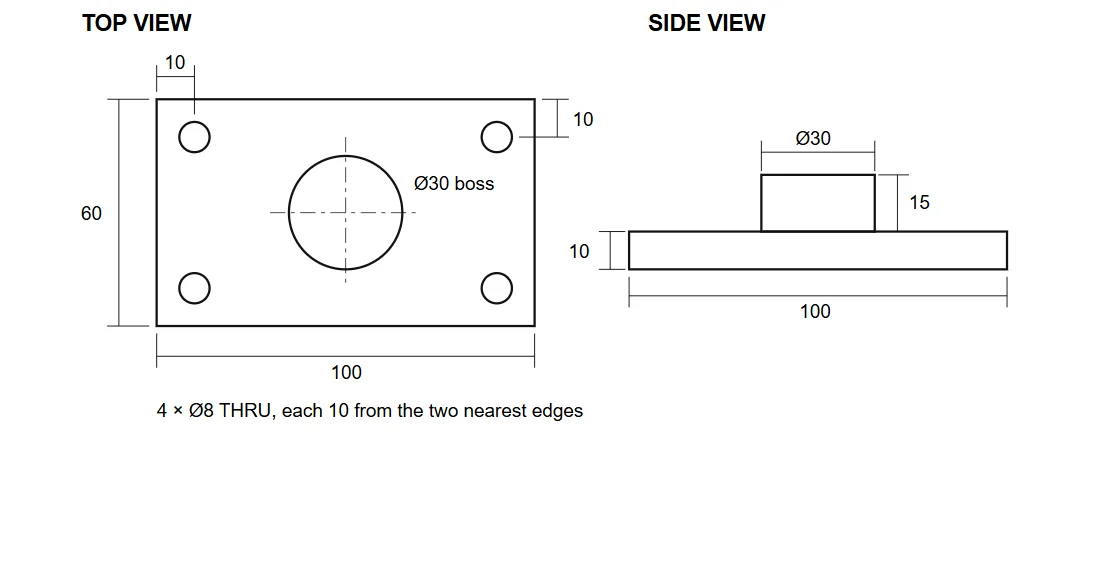
The PDF has two pages. Page 1 has the title and five notes; page 2, above, has a top view and a side view of a mounting plate: 100 by 60 and 10 thick, four through holes of diameter 8, each 10 from the two nearest edges, and a round boss of diameter 30, 15 high, in the centre. The message said only to model the part.
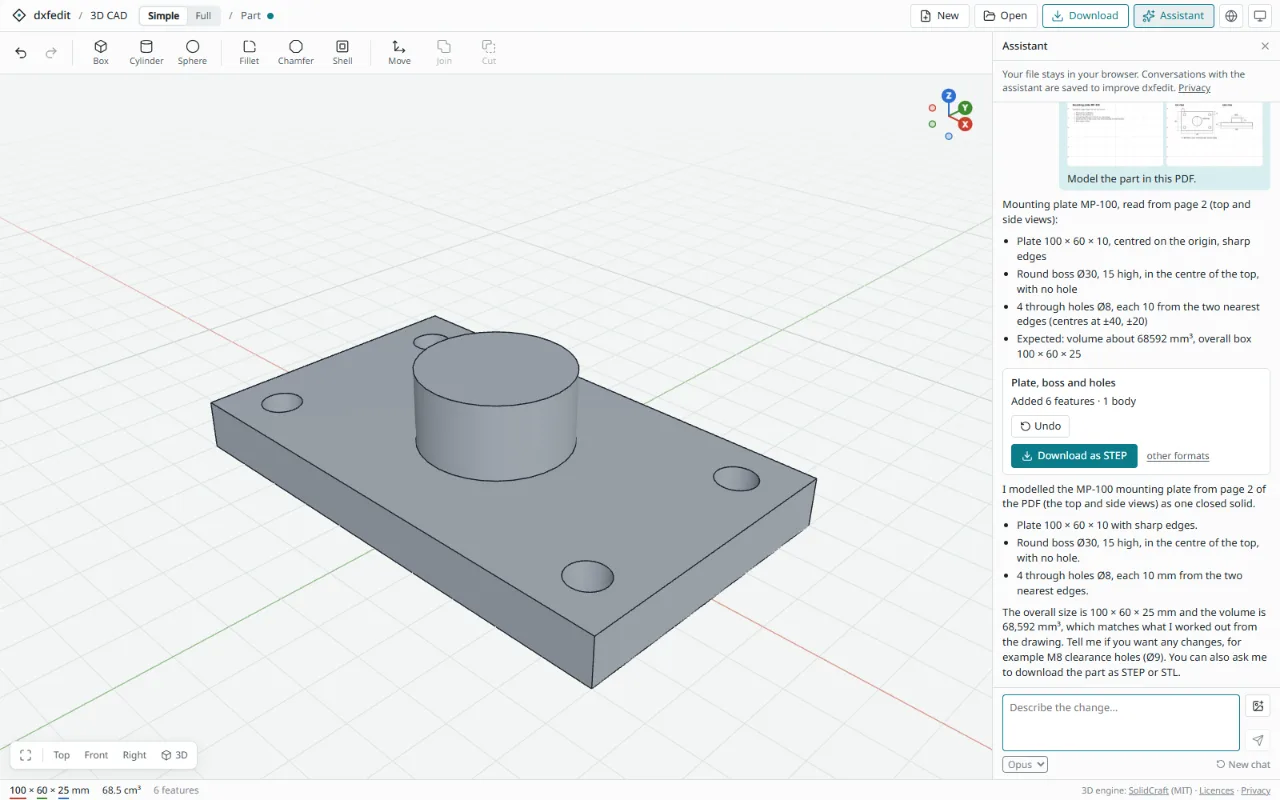
In under a minute the assistant built one solid of 100 × 60 × 25 mm, with the boss on top and the four holes through the plate at those distances. Before modelling, it wrote what it had read on page 2 and the volume it expected, 68,592 mm³, which is the one we worked out by hand; the page shows 68.5 cm³ for the part. Afterwards it offered changes, for example clearance holes for M8 bolts.
You can try the same: the PDF we attached and the STEP file that came out.
What the PDF needs
- Dimensions, written as numbers. The assistant models from the numbers it reads, not from how long a line is on the page. A size that is missing is one it has to assume, and it says which.
- Views that show the part from more than one side when its shape needs it, and where each hole or slot sits, measured from an edge or a centre.
- Units, written once.
- A PDF of up to three pages is shown to the assistant as its pages; for a longer one it sees an index of small pages and opens the ones it needs, zooming into the part of a page it has to read.
Limits
- It can misread a number or a view. Compare the size and the volume it reports with what you expect before you use the part.
- It models single parts and simple groups of bodies. A full assembly drawing, or a part with complex free-form surfaces, is beyond it.
- It does not turn the PDF's lines into geometry: it reads the drawing as a person would and models the part again. To convert a 2D drawing between file formats, see the DXF and DWG editor.
- The assistant is free for a number of requests; after them it goes on with credit: see pricing. A long session on a long PDF takes more than a short request.
The part is modelled in your browser and never uploaded. The PDF file itself stays in your browser: the pages the assistant looks at pass through our service as pictures and are not kept. To start from a hand sketch, see sketch to 3D model; from words alone, text to 3D CAD.
Questions
Can it convert any PDF into a 3D model?
No. It needs a drawing of a part with its dimensions written on it. It reads the views and the numbers and models the part; it does not measure the page.
What do I get?
A solid you download as STEP for CAD programs, or as STL or 3MF for 3D printing, or as OBJ.
Is my PDF uploaded?
The PDF file stays in your browser. The pages the assistant looks at pass through our service as pictures and are not kept.
How long does it take?
In our trial a two-page PDF of a plate with a boss and four holes took under a minute. A long PDF or a part with many features takes longer.
More guides
- Open a DWG file online, without AutoCAD
- A free online CAD, in your browser
- Convert DWG to DXF online
- Convert DWG to PDF online
- Convert DXF to DWG online
- Edit a DWG without AutoCAD
- A free DXF editor, in your browser
- Open and edit a DXF file online
- Convert a DXF or DWG from inches to millimetres
- Change a text in a DWG or DXF
- Fix overlapping texts and dimensions in a DWG or DXF
- Delete duplicate lines in a DXF or DWG
- Add dimensions to a DWG or DXF
- Prepare a DXF for laser cutting
- AutoCAD alternatives for DWG files: how CADQuill compares
- Text to DXF and DWG: describe a drawing, get a CAD file
- Put one part in front of another, without masks
- Open a DWG on a Mac, a Chromebook, Linux or an iPad
- Convert DXF to PDF online
- Convert DXF or DWG to SVG online
- Convert DWG or DXF to PNG online
- Convert DWG or DXF to STL, OBJ, GLB or STEP
- Convert to DXF R12 online
- Save a drawing for an older AutoCAD
- Measure a DWG or DXF online
- An AI assistant for DWG and DXF drawings
- Text to 3D CAD: describe a part, get a STEP file
- Sketch to 3D model
- Free 3D CAD online
- STEP viewer online, free
- STL viewer online, free
- 3MF viewer online, free
- OBJ viewer online, free
- Convert STL to STEP online
- Convert STEP to STL online
- Convert OBJ to STL online
- Convert 3MF to STL online
- Convert STL to OBJ online
- Convert STEP to OBJ online
- Convert OBJ to STEP online
- Convert STL to 3MF online
- Convert STEP to 3MF online
- AI CAD generator
- Examples: one message, and what came out
Last changed on 2026-11-28.