AI CAD generator
Say what you need with its sizes, and the assistant makes it with the commands of a CAD program: a 3D part you download as STEP, STL, 3MF or OBJ, or a 2D drawing with layers and dimensions you download as DXF, DWG or PDF. It runs in your browser; you can try it without an account.
Three things it makes
- A 3D part from words. In the 3D CAD, press Describe a part. The assistant models it with sketches, extrusions, holes, fillets and patterns, and you download STEP, STL, 3MF or OBJ. More in text to 3D CAD.
- A 2D drawing from words. In the 2D CAD (Full mode), press Describe a drawing. The assistant draws it on layers, with dimensions, and you download DXF, DWG or PDF. More in text to DXF.
- A change to a drawing you have. Open a DWG or DXF in the 2D CAD (Simple mode), say what to change, see the change in red and press Apply.
It also starts from a picture: a sketch with its sizes or the PDF of a drawing.
What happened in our trials
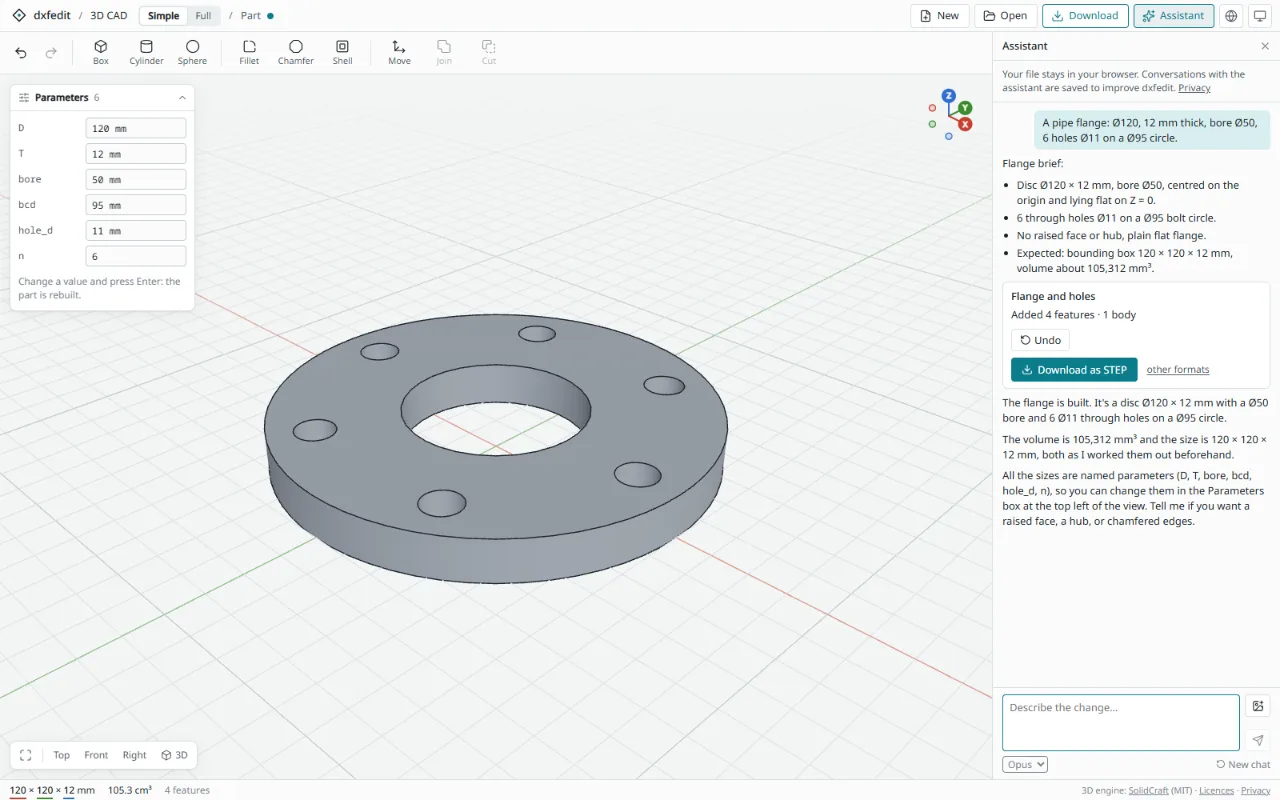
The flange. One message, the one under the first picture. Before modelling, the assistant wrote the size and the volume it expected; under a minute later the page showed one solid of 120 × 120 × 12 mm and 105.3 cm³, which is the volume we worked out by hand. The six sizes (diameter, thickness, bore, bolt circle, hole diameter, number of holes) are parameters: change a value and the part is rebuilt. The STEP file that came out.
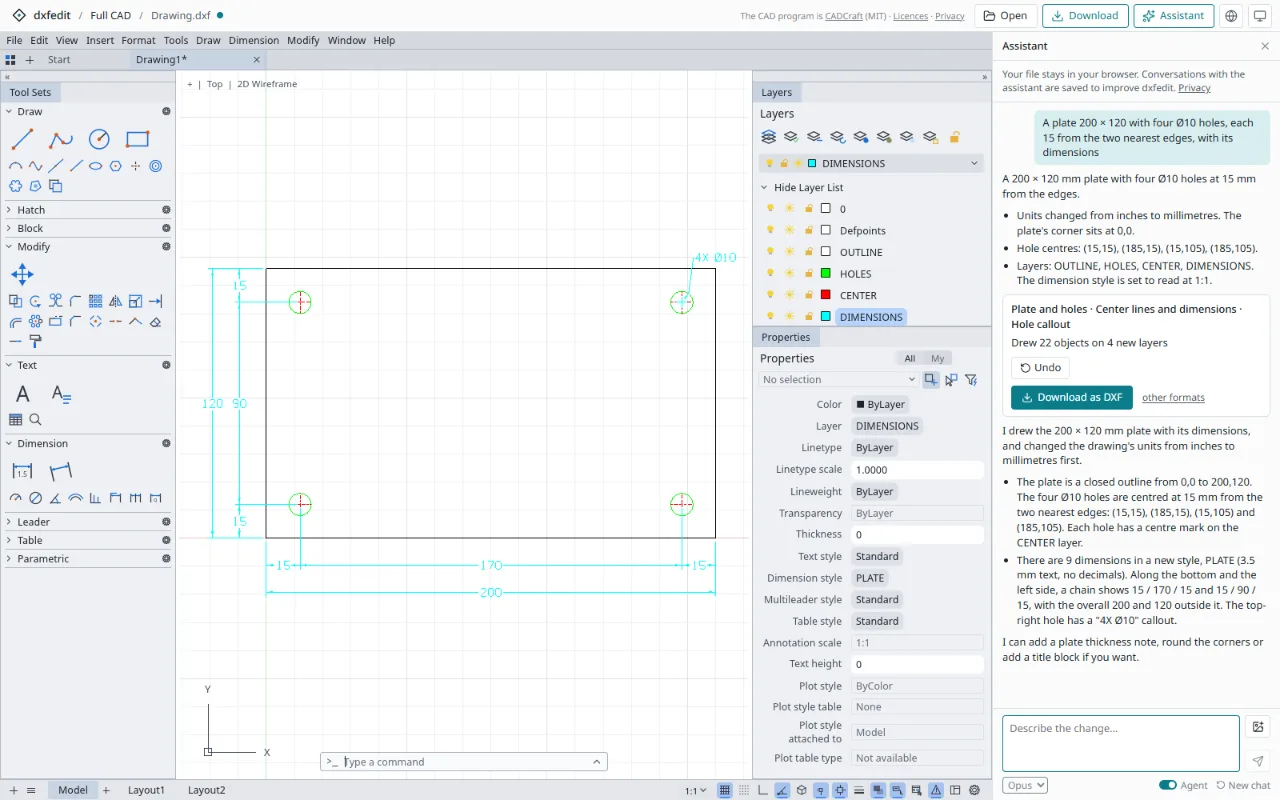
The plate. One message, the one under the second picture. Under a minute later the drawing had 22 objects on four new layers (outline, holes, centre marks, dimensions): the plate, the four holes 15 from the edges, and nine dimensions. The assistant said that it had changed the drawing's units from inches to millimetres first. The DXF file that came out.
A change. On the editor's example drawing, a flange plate, we wrote "Change the 8 bolt holes to Ø16". The assistant found the eight holes, at Ø13.5, and the note beside them, and showed the change; after Apply, 10 entities were changed: the eight circles and their callout.
All the outputs are on the examples page.
Why the result is real CAD
- The 3D part is a solid made of exact faces (planes, cylinders), not a mesh of triangles: a STEP file that a CAD program opens and goes on editing.
- The drawing is made of lines, circles, layers and dimensions, like one drawn by hand in a CAD program.
- What it makes are ordinary features and objects of the CAD on the page, so you can go on by hand from where it stopped, or undo what it did.
- It checks its own work: it compares the size and the volume of the part with what it expected, and says so.
Limits
- Give the sizes. Without them the assistant has to choose, and it says what it chose.
- It makes single parts and simple groups of bodies, and 2D drawings of ordinary size. A full machine, an assembly with its constraints or a rendered picture are beyond it.
- It can get a detail wrong. Check the sizes and the volume before you send the part to be made.
- The assistant is free for a number of requests; after them it goes on with credit: see pricing. Drawing and modelling by hand, opening, converting and saving files stay free.
The part or the drawing is made in your browser and never uploaded; your messages to the assistant pass through our service: see privacy.
Questions
Is there an AI that generates CAD files from text?
Yes. On CADQuill you describe a part and get a STEP, STL, 3MF or OBJ file, or describe a drawing and get DXF, DWG or PDF. It runs in the browser.
Is the result a mesh or a real solid?
A real solid, modelled with sketches, extrusions and holes, and saved as STEP. STL, 3MF and OBJ are there for 3D printing.
Is it free?
The CAD programs are free. The assistant is free for a number of requests, then it goes on with credit; the pricing page has the amounts.
Do I need an account?
No, not to try it. An account adds free requests and keeps your conversations.
More guides
- Open a DWG file online, without AutoCAD
- A free online CAD, in your browser
- Convert DWG to DXF online
- Convert DWG to PDF online
- Convert DXF to DWG online
- Edit a DWG without AutoCAD
- A free DXF editor, in your browser
- Open and edit a DXF file online
- Convert a DXF or DWG from inches to millimetres
- Change a text in a DWG or DXF
- Fix overlapping texts and dimensions in a DWG or DXF
- Delete duplicate lines in a DXF or DWG
- Add dimensions to a DWG or DXF
- Prepare a DXF for laser cutting
- AutoCAD alternatives for DWG files: how CADQuill compares
- Text to DXF and DWG: describe a drawing, get a CAD file
- Put one part in front of another, without masks
- Open a DWG on a Mac, a Chromebook, Linux or an iPad
- Convert DXF to PDF online
- Convert DXF or DWG to SVG online
- Convert DWG or DXF to PNG online
- Convert DWG or DXF to STL, OBJ, GLB or STEP
- Convert to DXF R12 online
- Save a drawing for an older AutoCAD
- Measure a DWG or DXF online
- An AI assistant for DWG and DXF drawings
- Text to 3D CAD: describe a part, get a STEP file
- Sketch to 3D model
- Free 3D CAD online
- STEP viewer online, free
- STL viewer online, free
- 3MF viewer online, free
- OBJ viewer online, free
- Convert STL to STEP online
- Convert STEP to STL online
- Convert OBJ to STL online
- Convert 3MF to STL online
- Convert STL to OBJ online
- Convert STEP to OBJ online
- Convert OBJ to STEP online
- Convert STL to 3MF online
- Convert STEP to 3MF online
- PDF to 3D model
- Examples: one message, and what came out
Last changed on 2026-11-27.